HomeSolutionsProductsSupportServicesTrainingPartnersCompanyContact     


assuriaONLINE Customer and Partner resources Logon / register


Assuria Auditor

Assuria Auditor RA

Assuria Information Manager

Regulatory compliance

CVSS and Assuria Auditor

Browser Web Interface

Assuria Auditor WorkBench

OVAL Compatibility

Assuria and HP

Release history

Supported platforms

System requirements

AssuriaOnline download centre


Assuria Auditor WorkBench

Assuria Auditor WorkBench, a component of Assuria Auditor, designed to streamline and assist a Security Administrator or Security Auditor’s work related to the analysis and allocation of actions relating to Assuria Auditor reported vulnerabilities and issues.

The WorkBench software module integrates seamlessly into the Auditor product with minimal effort and learning curve. WorkBench’s suite of rich features easily and quickly allows for the management of a server hardening project, the ‘spot audit/compliance’ of servers or the day to day monitoring of servers. Significant reductions in the manpower required to perform these often tedious functions is one of the strongest reasons for deploying and using the Workbench product.


Review and analysis

WorkBench enables the review and analysis of reported/found vulnerabilities culminating in the identification of required “actions” for each reported vulnerability or compliance variation.  The identification of required actions can be enhanced and customized based on the users knowledge and experience, this adds a vital and important dimension to both server hardening and IT security auditing.


Workbench’s reports and graphs can show weekly progress, monthly progress, servers scanned, servers reviewed, change controls, raided and completed actions. Reports generated are suitable for both the technical and managerial audiences.


Manage Projects

Assuria Workbench is the tool that allows your organization to manage projects, audits or ongoing scanning data, producing both monitoring and progress reports.  The current project/audit status is visible at any time and can be reported as required.


Seamless integration

Assuria WorkBench connects to the Assuria Auditor database and makes all Auditor scan results available to the WorkBench user for review, analysis and remediation recommendation thereby providing a closed loop solution.


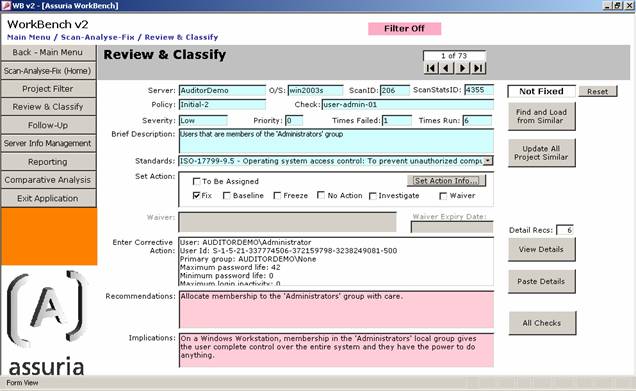
Assuria WorkBench allows the user to create and manage Workbench “Programs and Projects”. Each Workbench Project can consist of one or several Assuria Auditor scans and allows a security administrator/ auditor to step through, review, judge and assign appropriate actions to each of the Assuria Auditor reported ‘vulnerabilities’.


Assuria WorkBench connects to the Assuria Auditor database and makes all scan results available to the WorkBench user for analysis.  Assuria WorkBench allows the user to create and manage Programs which can, in turn, be divided into Projects.  Each WorkBench Project can consist of one or several scans and allows a security administrator / auditor to step through, review, judge and assign appropriate actions each of the Assuria Auditor reported “vulnerabilities”.  


More than one Assuria WorkBench can connect to an Assuria Auditor database allow multiple people to analyse and process Assuria Auditor data.


Assuria Workbench supports a generic audit / hardening / workflow process.  The basic steps are:

  • Scans of selected servers for compliance and vulnerabilities,

  • Review of results and allocation of Actions,

  • The generation and submission of Action requests for remediation,

  • Follow up scans to confirm that actions have been completed

  • Review of confirmation scan data and where appropriate base lining of systems.


Standards compliance

Assuria WorkBench includes filters that enable review of results against specific standards supported by Assuria Auditor.  WorkBench also supports the import of local standards mapped to Assuria Auditor checks.  Supported standards include ISO 27001, ISO 27002, FISMA, HIPAA and SOX. 


 Benefits

  • Assuria Workbench achieves productivity gains by assisting Security Auditors and Security Administrators to secure / audit a user defined population of servers.

  • Let Assuria Workbench demonstrate standards compliance, minimise the guess work. Quickly determine your level of compliance with key IT controls to meet government or industry regulations or audit requirements.

  • Assuria Workbench provides tools for “project monitoring” and “project progress” reports so that the current project status can be visible at any time. 

  • Assuria Workbench was developed as a result of a requirement to expedite the assessment of the security posture in an enterprise environment. Assuria consultants have contributed to the features and function of the current release of Workbench.


WorkBench reports

Assuria Workbench produces specialist reports and graphs, including:

•        Fix Report produces a Corrective Actions Report for the server and will include all records ‘ticked’ as Fix.

•        Graphs Report produces the graphs on a report suitable for printing.

•        No Actions Report reports all records ticked as ‘No Action’

•        Server Report reports the information supplied to the Update Server Info. Screen.

•        All Passes Report reports the checks for this server where the number of failures was 0. i.e. GOOD NEWS reporting (You have passed all these checks!)

•        Investigations Report reports those records ticked as ‘Investigation’ and requiring that further investigation is needed.

•        Baseline Report reports all those records ticked as Baseline.

•        Freeze Report reports all those records ticked as Freeze.

•        All Actions reports both Fix, Freeze and Baseline actions in a single report.


User defined Corrective actions

Assuria Workbench allows the user to build up a library of standard corrective actions or remediations based on the users own security policy and practices. Workbench provides facilities to apply corrective actions to one, many or all systems.


System Requirements

WorkBench has been developed on Microsoft Access 2000+ and SQL Server 2005 Express that requires either Windows 2000 or Windows XP.  Because of its use of graphs, Access needs to be installed with all its options, not just the default installation.


05/08/2010

© Copyright Assuria Limited 2009.  All rights reserved.
Assuria, Assuria Auditor, Assuria Log manager are trademarks of Assuria Limited.

Legal notice | Site map | Contact Assuria